

Group Leaders Bulletin September 2026
Some of the information in the Group Leaders bulletin is relevant only to groups which use an IGO Zoom account. So in future, there will be two sections. Part 1 for all group leaders, Part 2 for groups using an IGO Zoom account
Part 1: All groups
Code of conduct
This can be found in the Guidance for IGO members. Please help us to uphold this. We expect everyone to follow it, if you have members who are not doing so, then please tell us, and we will follow it up.
Group leaders informal meetings
The Group Leaders Informal Meeting is an opportunity for IGO Group Leaders to talk with other leaders and share experiences, advice and tips about running an online interest group. There is no agenda, as this is an informal group. You can join the group from the Members Portal.
Several of this items discussed here were raised at the last meeting.
Language group leaders group
This has been set up to allow leaders of our various language groups to share ideas and practices. All our language group leaders can join via the Members portal. It is optional.
Summer break/bank holidays
It is entirely up to group leaders to decide whether to have a break in summer or indeed any other time. Some groups meet on bank holidays, others don’t. It’s your choice. IGO Zoom meetings are booked for all dates whether or not the group meets.
Recording meetings
There is detailed guidance about this at Recording an IGO Zoom meeting. Make sure that you have permission from everyone present. If you plan to post the recording on YouTube, it must be unlisted. It should only be shared within the group and should not be made publicly available. Also, you should ensure that the video does not contain any copyrighted material.
Communication between group members
If your group members would like to contact one another between meeting, this can be done by:
- Sharing email addresses. You will need to get written consent (email is fine) from everyone whose email is shared with other members
- You can set up a WhatsApp group and send the link to members so they can join this themselves via their social media platforms – just make sure you get permission to share information, or else allow everyone to join themselves.
Sharing resources with other u3as
It could be useful to share data with groups in other u3as. The first port of call should probably be the u3a Subject Adviser if there is one. You can also find information about what groups are running in other u3as on the Oversights website.
Keep your webpage up-to-date
Please have a look at your group's web page from time to time to see if it needs updating. Use the Group Description form to request changes, or send an email using the email address below if it is a minor change.
Keeping track of emails sent via Beacon
There is a link on Beacon Admin home page which allows you to see who you sent an email to and when you sent it.
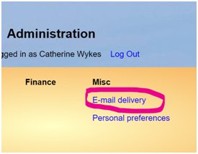
Click on the E-mail delivery link and you will get this:
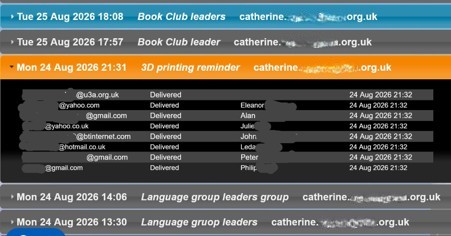
If you click on one of them, you will see the names and email addresses of everyone you emailed, and also whether or not it was delivered.
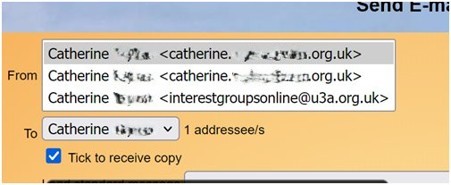
It won’t show you the content of the email you sent, but it you have ticked the “tick to receive copy” box when you are sending your email, you will be able to identify it in your sent mailbox with the date and time of sending.
Future group leaders meetings
The next Informal Group leaders meeting is Monday 26 October.
The next Group leaders will be on Tuesday 10 November at 2pm.
These can be found at the link above.
Help and Information on our website
This section on the IGO website has answers to many of the questions which you may have about running a group.
If there is something missing, please let us know and we will add it.
Part 2: Groups using IGO Zoom accounts
Extending Zoom bookings
I am in the process of extending all our Zoom bookings. Some have been extended indefinitely, but for reasons I don’t understand, this cannot done for all bookings. Some are limited to the end of June 2027, and the remainder are booked until the end of 2027. When this has been completed, I will send out a timetable so you can check your meeting has been extended.
Note that the Zoom link for a given meeting is always the same, including when the booking is extended. You may want to tell this to your group members.
Host code
IGO Zoom account meetings are set up so that everyone can join 15 minutes before the meeting. The group leader does not have to do anything except to be there. Zoom groups may required host control of the meeting so that break-out rooms can be set up, members can be muted and people can be removed (though we hope this won’t be necessary!). Host control can be obtained using the host code which is the same for all four Zoom accounts = email us if you don’t have it. You will find information about how to use it at IGO Zoom accounts
IGO Zoom September calendar
This is attached. It lists all the meetings which are booked in September on IGO Zoom accounts. If you are unsure about your booking, please check that your meeting is included on the list and that the Meeting ID matches what you have. If not, please contact us immediately.
Note that Acc 1 allows only one meeting at a time, while the other three accounts allow two meetings to run at the same time.
Generic Zoom calendar
This shows all the IGO Zoom account bookings, with an extra half hour added so that there is a 30 minute gap between consecutive meetings. As noted above, Acc 1 allows only one meeting at a time, while the other three accounts allow two meetings to run at the same time. You can use this to check if there is a vacancy in a given slot.
Thank you
To all our group leaders for your sterling work!
From Catherine, on behalf of the IGO team
You can contact anyone on the team using this email.